 TehkStore
The Discord bot
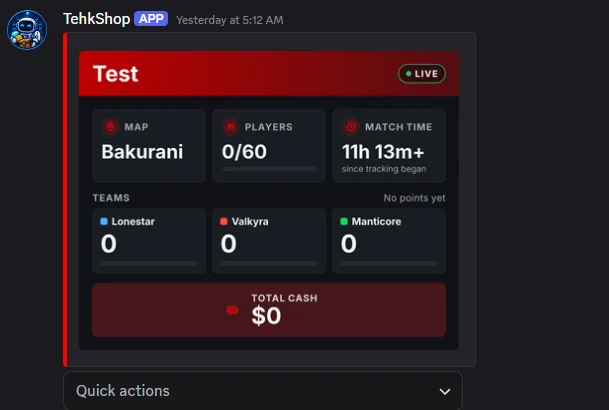
The TehkStore Discord bot posts a live status board for your WARDOGS servers in a channel, and answers slash commands. You don't need a store to use it.
Add it
- Open Discord bot in the dashboard and press Add to Discord.
- Choose your Discord server and approve it.
If you don't have a store, connect your WARDOGS servers under Your WARDOGS servers on the Discord bot page, the same way as connecting a server.
Set it up
Open your Discord server's settings page in TehkStore:
- Servers: which WARDOGS servers to show, and in what order.
- Status board: the Channel to post in, Board enabled, and which stats to show (match time, players, team points, map, total cash).
- Look: the Colour and Title, with a preview.
- Command access: Everyone, or Only these roles. Members with Manage Server can always use the commands.
- Health: whether the bot can post where it needs to.
Commands
- `/status`: live stats for your servers.
- `/player`: a player's cash, kills, deaths and time on your servers.
Remove from TehkStore disconnects the bot from that Discord server.